Dreamports

Settings

Menu soundsSoft clicks and chimes as you move. Made for Dreamports and played by your own browser.
LookLight, or dark for the evening.
MotionCalm keeps the games still and swaps the slides for fades.

The menu remembers nothing yet. Your privacy

What a Dreamport is

dreamports.net is a home for enhanced fan ports of classic games, made by a fan, for fans.

A Dreamport is the port fans always dreamed of: the game you remember, with the extras you wished it had. It starts from the game as you know it, then adds the things fans have asked for over the years.

What you’ll find here

  • Dreamports. The ports made here, by Nahuel Genchi.
  • Mash-ups. Great ports made by other fans, and fan games that aren’t ports, like Kirby’s Dead Land. Dreamports links to other fans’ own pages and credits the people who made them.

Bring your own game

Dreamports never hosts game files: no ROMs, no game data and nothing taken from a game. It only lists projects that ask you to use your own legal copy, and before every play or download link it asks you to confirm that you are.

  1. You own the game, on a cartridge, a disc or from a store.
  2. You copy it to your computer. That copy is called a ROM, or a game dump.
  3. The port reads your copy on your device, and never uploads it.

Your privacy

There are no accounts, no ads and no cookies. The site keeps a few small notes in your own browser: whether you switched on menu sounds, which look and motion you picked, and, until you close the tab, which games you’ve confirmed you own. Those notes never leave your device, and “Forget my choices” in Settings clears your menu choices at any time.

Sonic Advance Dreamport, played here on dreamports.net, keeps its own notes in your browser: your settings, the emeralds you’ve collected and, unless you untick “Remember on this device”, your game files, so you don’t have to add them on every visit. They never leave your device either, and clearing this site’s data removes them.

To see which pages people read, the site counts visits with Cloudflare Web Analytics. It notes the page you opened, the site that sent you there, your browser, your country and how fast the page loaded. It stores nothing in your browser, doesn’t keep your IP address and doesn’t follow you to other sites.
Credits

Suggest a port, report a problem or get in touch

Open an issue on GitHub. It takes a free GitHub account, and you don’t need to be a developer to fill it in. Please never attach game files.

For anything else, including messages from publishers or other rights holders, write to hello@dreamports.net.

Close

Dreamport · Game Boy Advance · 2001

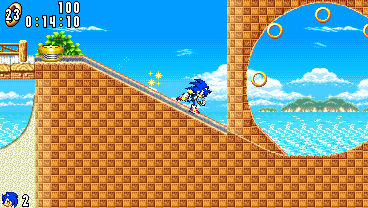
Sonic Advance Dreamport

Sonic Advance, rebuilt to play in your web browser. No emulator, nothing to install, and every extra is optional.

The game

Original
Sonic Advance, Game Boy Advance, 2001
You need
Your own copy of Sonic Advance (USA), as a .gba file
Plays in
Your web browser
Controls
Keyboard, Xbox controller or touch
Status
Early days: every zone is playable, and six special stages are on the way
Made by
Nahuel Genchi
Source code
On GitHub

What it adds

Four extras on top of the original game. Each one is off until you switch it on, and with all of them off, the game plays just like the cartridge.

  • Widescreen view. See more of each act around the original screen, up to 368 × 208, with every pixel still sharp.
  • Sonic Rush boost. Hold a button and Sonic blasts ahead at top speed, in Rush’s blue aura and trail. Needs your copy of Sonic Rush too.
  • Boost Mode. From Sonic Advance 2: keep running flat out and Sonic breaks into an even faster run. Needs your copy of Sonic Advance 2 too.
  • Sonic Advance 2 tricks. Four mid-air tricks: the Back Star, the Hop Jump, the Humming Top and the Bound. Needs your copy of Sonic Advance 2 too.

Play in three steps

  1. Tick the box in Before you play and press Play. A current desktop browser works best.
  2. Add your Sonic Advance file, the .gba copied from your cartridge. Tick Remember on this device to keep it for next time.
  3. Play. Press H during the game to see the controls.

Credits

Made by Nahuel Genchi. The game’s rules come from SAT-R, the community project that turned Sonic Advance’s program back into readable code.

Close

Before you play

This Dreamport reads your own copy of Sonic Advance: the .gba file copied from your cartridge. Dreamports never hosts game files and can’t give you one.

Tick the box to unlock play.Opens the game here on dreamports.net. Your copy stays on your device.

Close

Other game · A mod for Dead Cells

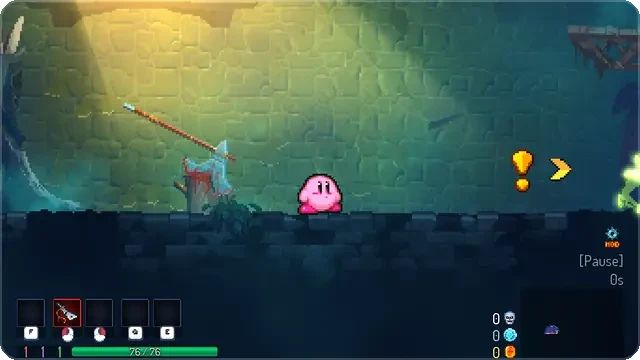
Kirby’s Dead Land

Play as Kirby inside Dead Cells. He runs, floats, inhales enemies and copies their powers, because the real Kirby Super Star Ultra is running inside the mod and moving him.

The game

Built on
Dead Cells, on Steam (tested with version 35)
You need
Dead Cells, and your own copy of Kirby Super Star Ultra (USA) as a .nds file
Plays on
A 64-bit Linux PC. Windows is a test version
Space
About 1 GB of disk, and about 6 GB of free memory while playing
Your saves
Nothing in your Steam folder changes. Kirby has his own saves, and your normal saves are backed up every time you play
Made by
Nahuel Genchi
Source code
On GitHub

What it adds

  • The real Kirby. His moves, his 24 copy abilities, his sprites and his sounds all come from your own copy of the DS game.
  • Inhale, swallow, copy. Hold attack to suck an enemy in, then press down to swallow it and copy a random power. Or spit it back out as a star.
  • Weapons turn into powers. Kirby can’t hold a sword, so every weapon and skill you find becomes an ability item: inhale it and swallow it to copy that power.
  • The real Dead Cells. The same levels, enemies, bosses, shops and unlocks, with a few rules changed to fit Kirby.

Play in four steps

  1. Tick the box in Before you play and download the Linux .AppImage.
  2. Right-click it, open Properties and turn on Allow running as a program. Then double-click it.
  3. The launcher looks for Steam, Dead Cells and your Kirby game by itself. Press Set up Kirby once, and it builds your Kirby from your own game files in about two minutes.
  4. Press Play, and choose New game to start a Kirby run.

On Windows, the test version is a .zip: right-click it, choose Extract all, open the folder and double-click Kirby’s Dead Land.

Credits

Made by Nahuel Genchi. It runs on Dead Cells Core Modding, and plays your Kirby game in the melonDS emulator. Kirby Super Star Ultra is by HAL Laboratory and Nintendo, and Dead Cells by Motion Twin and Evil Empire.

Close

Before you play

This mod needs two games you own: Dead Cells, installed with Steam, and Kirby Super Star Ultra (USA), as the .nds file copied from your game card. The mod only reads your Kirby game and never changes it. Dreamports never hosts game files and can’t give you one.

Tick the box to unlock the downloads.Downloads come from GitHub. The Windows version hasn’t been tried on a real Windows 11 PC yet.

Close